
Originally Posted On: https://hometipsforyou.com/a-practical-guide-to-comparing-an-aeron-chair-against-mesh-task-chairs/
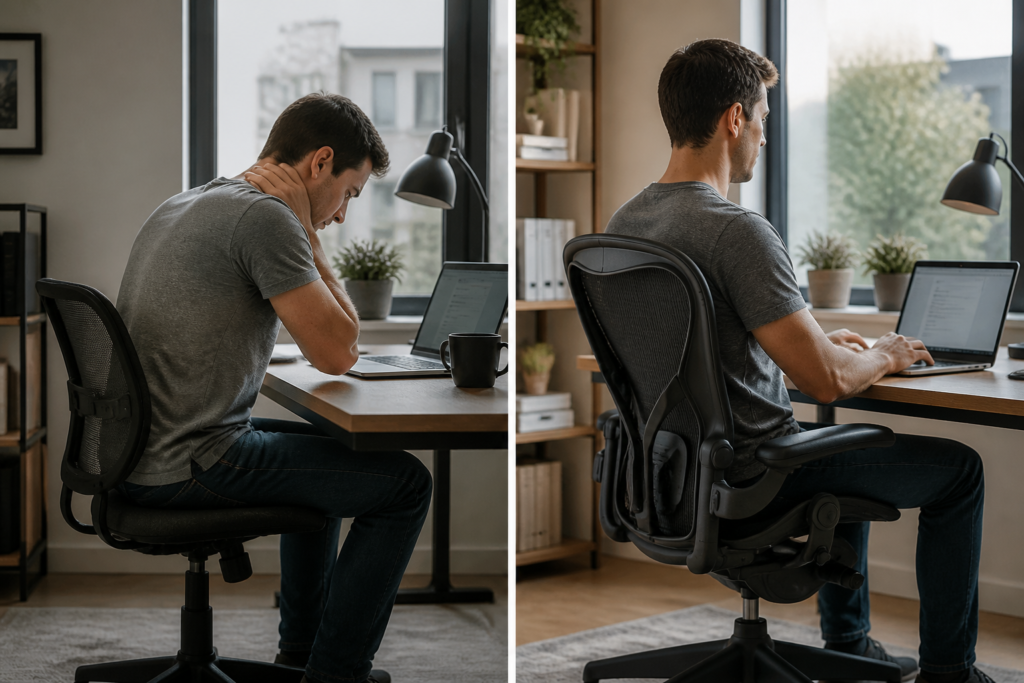
Six hours into a workday, your lower back starts talking to you — and it’s not saying anything nice. That’s usually the moment someone starts Googling whether an Aeron chair is actually worth the money compared to the mesh task chair sitting in their cart for a fraction of the price. Fair question. Both use breathable mesh material and both claim to fix your posture, so what’s the real difference?
Here’s what most people miss: it’s not about mesh versus mesh. It’s about what’s underneath it. A generic mesh task chair gives you a flat, evenly-tensioned back panel and calls it ergonomic. The Herman Miller Aeron chair, on the other hand, builds its support around actual spinal mechanics — sacral support, lumbar curve, weight-responsive recline. Those aren’t marketing words. They’re the difference between a chair that just looks supportive on a product page and one that actually holds your pelvis in a healthy position for eight straight hours.
What You’ll Achieve and What You Need Before You Start
Picture a developer who’s spent three years in a $250 mesh chair from a big-box store, now negotiating a raise and finally ready to fix the ache in her lower back. She’s got two tabs open — one comparing an Aeron chair against a generic mesh task chair, another full of Reddit threads arguing about which is overrated. That’s the exact spot this guide starts from.
Your Goal: A Confident, Spine-Smart Purchase Decision
Materials to Gather (Measurements, Budget, Workspace Notes)
Before comparing chairs, get specific. Grab a tape measure and note your height, weight, and torso length — these determine sizing between models. Set a hard budget ceiling, including whether refurbished or used inventory is on the table. Walk your workspace and jot down clearance, flooring type (hardwood vs. carpet), and desk height.
-
Height and weight for sizing
-
Budget range, new vs. used
-
Desk height and floor type
-
Hours seated per day
Keep this Aeron chair buying guide handy for sizing checkpoints along the way.
Step 1: Understand How the Aeron Chair’s Design Supports Your Spine
Your spine doesn’t care about brand names. It cares about load distribution and consistent contact with a surface that moves as you do. That’s the entire engineering premise behind the Aeron chair, and it’s why comparing it against a flat mesh task chair isn’t really a fair fight from a biomechanics standpoint. If you’re weighing options, browsing a Herman Miller Aeron chair sale is a reasonable first move before you commit.
The 8Z Pellicle Suspension and Pressure Distribution
Most budget mesh chairs use one uniform tension zone — your sacrum — your shoulder blades get identical resistance. That’s a problem. The 8Z Pellicle material splits support into eight zones, so your pelvis gets firmer backing while your upper back gets more give. Pressure gets spread out instead of concentrated at two or three hot spots.
PostureFit SL vs. Adjustable Lumbar Support
PostureFit SL supports the sacrum directly, not just the lumbar curve above it — that distinction matters more than people realize. Adjustable lumbar pads help — they only address one segment of the spine’s natural S-curve. Before buying, check the Aeron chair product options to see which back-support configuration fits your body and existing pain points.
Step 2: Identify What Generic Mesh Task Chairs Typically Offer (and Lack)
Ever sat in a big-box mesh chair for six straight hours and felt your lower back just give up by 3 p.m.? That’s not bad luck — it’s a design gap. Most mesh task chairs use a single sheet of stretch fabric with zero zoned tension, so your lumbar spine gets the same flimsy give as your shoulder blades. Compare that to an Aeron chair, which uses eight zones of varying tension to actually match pressure to body regions.
Common Mesh Task Chair Limitations for Multi-Hour Sitting
Generic mesh chairs usually skip a few things that matter for spinal health:
-
Fixed or missing lumbar support instead of an adjustable pad
-
Basic pneumatic cylinders that sag under sustained pressure within a year or two
-
Cheap tilt mechanisms with one recline setting, not proper torsion control
-
Thin armrests with no depth or pivot adjustment
If you’re browsing an Aeron chair for sale, you’re getting engineered tension zones and PostureFit SL instead of guesswork. And don’t overlook the paperwork — checking Aeron chair warranty coverage tells you a lot about how long a manufacturer expects its own chair to actually last.
Step 3: Compare Adjustability — Tilt Mechanisms, Torsion Control, and Arms
Here’s a number that surprises most buyers: an Aeron chair offers three distinct recline stops, while most mesh task chairs give you exactly one free-float setting and call it a day. That gap matters more than spec sheets suggest — your spine doesn’t sit still for eight hours, so a chair that locks into one posture is working against you.
Harmonic Tilt and Tension Settings Explained
The Harmonic tilt system pairs a torsion control knob with a forward-tilt option, letting the backrest track your weight instead of fighting it. Turn the tension dial tighter and recline resistance increases; loosen it and the chair reclines with less effort. Cheaper mesh chairs typically use a single spring with no torsion adjustment, which forces heavier or lighter users into the same resistance curve — not ideal for anyone outside the average weight range.
Fully Adjustable Arms and Shoulder Alignment
Height, width, depth, and pivot adjustments on the arms let you support the forearms without hiking the shoulders. Poorly positioned arms are a leading cause of shoulder and neck strain during long typing sessions. Ready to feel the difference yourself? Buy Aeron chair models with fully loaded arm configurations for precise control.
Step 4: Measure Your Body and Match It to the Herman Miller Aeron Size Chart
Here’s a myth worth killing: bigger isn’t always better, and grabbing whatever Aeron chair shows up first in a search isn’t sizing. Fit comes from your height and weight, not guesswork. Pull a tape measure before you shop.
Size A, B, and C: Who Fits Where
Size A suits users roughly 4’10” to 5’7″ and under 130 lbs. Size B, the most common pick, fits 5’3″ to 6’2″ and 130-230 lbs. Size C works for taller or larger frames, generally 5’9″ to 6’6″ and over 200 lbs. Check the Herman Miller Aeron sale listings by size before comparing against any mesh task chair, since mesh alternatives rarely offer three distinct frame sizes at all.
Why Seat Depth and Pneumatic Cylinder Height Matter for Circulation
Seat depth that’s too long presses the back of your knees, cutting circulation and causing numbness within an hour. The pneumatic cylinder controls seat height so your thighs stay parallel to the floor and feet rest flat. Get either measurement wrong and even premium mesh construction won’t stop discomfort.
Step 5: Weigh Price Against Long-Term Value
Picture two coworkers setting up home offices the same week. One buys a $180 mesh task chair from a big-box store. The other checks the Herman Miller Aeron chair price on a certified refurbished model and lands closer to $700. Eighteen months later, the mesh chair’s gas cylinder sags and the tilt tension knob strips out. The Aeron owner hasn’t touched a wrench.
New vs. Certified Refurbished Aeron Pricing Considerations
New Aeron chairs run well over $1,500.
A certified refurbished unit typically costs 40-50% less while keeping the pneumatic cylinder, PostureFit SL, and tilt mechanism fully tested and warrantied. That gap matters when you’re comparing against a $200-$400 mesh chair that looks similar on paper but uses thinner torsion springs and a lower-grade aluminum base.
Calculating Cost-Per-Year of Use Against Cheaper Mesh Alternatives
Run the math over a decade.
A $250 mesh chair replaced twice costs roughly $75/year and comes with two disposal headaches. A $700 refurbished Aeron, backed by a long warranty and rated for 12+ years of daily sitting, works out to about $58/year. Cheaper up front doesn’t mean cheaper over time.
Step 6: Decide Between a Classic Aeron, a Remastered Aeron, or an Aeron with Headrest
Not every Aeron is built the same, and that matters more than most buyers realize. The Classic (pre-2016) uses a different frame and Pellicle tension than the Remastered version, so parts don’t always swap between them — check before you buy a mismatched replacement part. From a spine-support standpoint, the Remastered model’s PostureFit SL is the bigger upgrade over Classic’s basic lumbar pad. It actually cradles the sacrum instead of just pushing on the lower back.
Headrests are a separate decision entirely. Herman Miller never sold a factory headrest for the Aeron, so any headrest you see bolted on is an aftermarket add-on. That’s fine for neck support during recline, but it does add pivot points that can loosen with heavy use, so factor that into long-term maintenance.
Here’s what most people miss: the Remastered frame, updated Pellicle material, and PostureFit SL combine to noticeably reduce shoulder and lower-back strain over a full workday compared to Classic models. If you’re weighing configurations, review current Herman Miller Aeron chair sale options before locking in a size or headrest choice.
Common Mistakes to Avoid When Choosing Between an Aeron and a Mesh Task Chair
Skipping the Size Chart and Guessing Your Fit
How many buyers pick a size without ever measuring themselves?
Too many. An aeron chair comes in three sizes, and picking wrong throws off seat depth, pan width, and where lumbar support hits your spine. Size B fits most people between 5’3″ and 6’2″, but if you’re outside that range, guessing costs you comfort — and possibly a return shipment. Measure your height and weight against the manufacturer’s chart before buying, not after it arrives.
Ignoring Adjustment Setup After Delivery
A chair that’s never been tuned to your body won’t outperform a mesh task chair, no matter how well it’s engineered. Pneumatic height, tilt tension, — armrest depth all need setup on day one. Skip that step, and you’re sitting in a slouched, unsupported position — the same problem you were trying to fix.
Buyers shopping secondhand also need to check torsion springs, the tilt mechanism, and cylinder wear before committing. If you want authenticated, professionally inspected options instead of a private-seller gamble, browsing a Herman Miller chairs outlet gives you verified condition reports up front.
Next Steps: Confirming You’ve Made the Right Ergonomic Choice
Roughly 80% of adults deal with lower back pain at some point — desk workers report symptom flare-ups within 90 days of switching to unsupportive seating. That number alone should push you toward testing your chair choice properly, not just guessing.
Sit in your chosen chair for a full workday before deciding it’s final. Check three things: does your lower back stay in contact with the lumbar support during typing, does the seat pan avoid pressing behind your knees, and do your shoulders stay relaxed at the keyboard? If any of those fail after eight hours, adjust the settings again before writing off the chair.
A mesh task chair might pass the test if you run warm or move frequently. An Aeron-style build tends to win for users who sit still longer and need firmer pelvic support.
Budget matters here too.
If you’re weighing premium support against cost, a certified pre-owned Aeron chair gives you the same PostureFit and 8Z Pellicle mesh benefits without the full retail hit. Recheck fit after 30 days — your body adapts, and so should your settings.
How-To FAQ
Is the Aeron chair worth it compared to a mesh task chair?
Yes, for anyone sitting more than 6 hours a day, the Aeron earns its keep. The 8Z Pellicle suspension and PostureFit SL back support address pressure points and spinal alignment that a generic mesh chair usually can’t match. If you’re only at your desk 3-4 hours a day, a quality mesh task chair might genuinely be enough.
Why do Aeron chairs cost so much more than other mesh chairs?
The price reflects engineering, not just branding.
Herman Miller builds the Aeron around a torsion-based tilt mechanism, a pneumatic cylinder rated for heavy daily use, and a dual-pad lumbar system tuned for the sacrum and lower spine — features that budget mesh chairs typically skip or cheapen. A certified refurbished Aeron gets you that same engineering at a lower entry point.
How do I know which Aeron size — A, B, or C — fits me?
Check your height and weight against the size chart before you buy, not after. Size B fits roughly 70% of adults between 5’3″ and 6’2″, so start there unless you’re notably petite or tall. Size C suits larger frames over 5’9″ and 200+ lbs, and Size A is built for smaller users under 5’7″ and 130 lbs.
Can I add a headrest to an Aeron chair later, or do I need to buy it that way?
You can retrofit a headrest onto most Aeron models, but it’s easier — and usually cheaper — to buy the chair already configured with one. If your work involves a lot of reclining or video calls where you lean back, get the headrest version from the start rather than adding it after the fact.
What’s the real difference between a classic Aeron and a remastered Aeron?
The classic Aeron (pre-2016) uses the original Pellicle and lumbar pad design, while the remastered version added PostureFit SL, a stiffer frame, and updated casters. Neither is broken or outdated — the classic still holds up mechanically — but the remastered model gives you finer lumbar control. Check the tilt mechanism and cylinder before assuming which generation you’re looking at, since sellers don’t always label it clearly.
How long does it take to get an Aeron chair properly adjusted after delivery?
Plan on 15-20 minutes for the initial setup and another week of small tweaks. Set seat height first so your feet sit flat with thighs parallel to the floor, then dial in seat depth, arm height, and tension before touching the lumbar knob. Most people re-adjust the recline tension once they’ve sat in it for a full workday — that’s normal, not a sign you bought the wrong chair.
Choosing between an Aeron chair and a generic mesh task chair really comes down to how your spine loads up over an 8-hour day. Cheap mesh flexes where it shouldn’t and goes flat where you need firm resistance under the sacrum. That’s the gap PostureFit SL and the 8Z Pellicle system were built to close.
Size matters just as much as mechanism. A person who skips the sizing chart and grabs a random Size B is setting themselves up for the same knee pressure and shoulder strain they’re trying to escape. Measure first. Sit second.
Budget concerns are real, but run the math on cost per year, not sticker price alone. A certified, professionally restored Aeron with a long warranty will often outlast three or four budget mesh chairs bought back-to-back.
Here’s the honest next step: pull a tape measure, check your height and weight against the sizing chart, and match that to the configuration that fits your actual workday. Don’t guess your way into another chair you’ll replace in two years.


